Just a quick update on my game's progress.
As you can see I've added some loot and powerups!! I know how much we all love the shinys! In the future I will implement a way to actually spend these coins.
I am still in the very early stages of my game, just creating the basic objects. I'm basing my game heavily on Smash T.V. I routinely load that game up and study its mechanics lol! Did you know that a lot of the enemies in that game head towards the center of the screen upon entering the game and then switch to a playerchase method? Well now you do. I assume the Smash devs did this to stop the enemies from walking through the edge walls to get to the player. This can occur frequently if the quickest vector from the enemy to the player goes through the screen edge. I'm working on a system to fix this problem but it's not shown in the video.
I've increased the size of my characters by a few pixels and I think it makes a big difference in the gameplay. I am very conscious of character size in relation to the game world and its effect on immersion. All sizes are still subject to change.
-Darth
Saturday, April 3, 2010


Wednesday, March 31, 2010
War Of Words
"Is this made by the same guys that did that other one"
I knew which game she was referring to, "Puzzle Quest, no it's not. It does borrow a lot from it though."
"Borrowed? it's exactly the same game just with words, more like stealing." She laughed.
And I started thinking about the line that we drew when deciding how tangible something must be to have copyright protection. Ideas cannot be copyrighted, but why is that? Game mechanics and the code that was used to create the mechanics can be protected, but not the gameplay that results?
She asked for the controller, which only happened occasionally. The quest description popped up and I got halfway through the first sentence, then it disappeared.
"Where you reading that?"
"Yeah but I can read it later." I was assuming I would be able to.
Soon after the game started I told her the right trigger moves the letters up. And then I told her about the right thumbstick and the spells, press Y to cast. I didn't feel any need to go into of the details. The low level spells aren't anything special anyway.
She made a couple good words but was slaughtered, "I killed it" She said and dropped the controller to the floor.

The battles can be a bit difficult, For a few games I tried to copy what the AI was doing. The AI is a fast speller with a preternatural understanding of the grid, I was able to store a few of its words into my memory and with practice I could probably beat the AI at its own game, or at least tie.
The only way to win is not to play.
But if you're not lost in your own world, playing a game only you can understand, then you won't be noticing the other side that much, except when the AI is destroying you, then you will become paralyzed.
If you happen to be stuck on a particular quest, take heart in the fact that solving tavern puzzles and searching for treasure both offer XP. The former entails an anagram variant and the latter is always a riddle. I've solved them all so far but one, and I find myself wandering around the countryside thinking about the engima. Maybe the dragon knows the answer.
After you gain a few levels, try the quest again. A few levels difference between you and your opponent will slow the game down a lot, and allow you to focus on big words or casting spells. Darthuvius is level 28 at the moment and I have encountered a level 32 ghost in a haunted tower. After solving all the riddles and the easier tavern puzzles, I am forced to try the instant battle mode from the main menu for XP. These non-campaign battles will allow you to level, so you could theoretically play only these and then stomp through the entire game if you wish since the quest enemies in the game don't scale.
Word games need to strike a balance between relaxation and stress. I would side with the relaxists of course. If any game features an endless or timeless mode, that is always the first one I accept. Time limits and the FireLine in War Of Words usually just annoy me. If your letters touch the flames they explode causing serious harm and destruction of many letters, which you may have been just about to use. There's a spell which calls forth a giant boulder to halt the upward progress of your letters, so maybe there's a spell to remove these timelimits altogether. Probably a pretty high level spell I imagine.
Every advance in level comes with the learning of a new spell, their effects can be damaging, transfiguring, thieving, and lifesaving when used at the right time. You might find certain powerful combos as well.
The game has its faults of course, as every game does. On the overhead map, you would think that pulling the thumbstick down would point your character to the town that is on the southerly road. Your direction recognition needs to be a bit more precise to get around Lexica. Maybe even floating point precise. But with a little button mashing you can get around the map.
-Darth
I knew which game she was referring to, "Puzzle Quest, no it's not. It does borrow a lot from it though."
"Borrowed? it's exactly the same game just with words, more like stealing." She laughed.
And I started thinking about the line that we drew when deciding how tangible something must be to have copyright protection. Ideas cannot be copyrighted, but why is that? Game mechanics and the code that was used to create the mechanics can be protected, but not the gameplay that results?
She asked for the controller, which only happened occasionally. The quest description popped up and I got halfway through the first sentence, then it disappeared.
"Where you reading that?"
"Yeah but I can read it later." I was assuming I would be able to.
Soon after the game started I told her the right trigger moves the letters up. And then I told her about the right thumbstick and the spells, press Y to cast. I didn't feel any need to go into of the details. The low level spells aren't anything special anyway.
She made a couple good words but was slaughtered, "I killed it" She said and dropped the controller to the floor.
Both players are presented with the same letter sequence.

The only way to win is not to play.
But if you're not lost in your own world, playing a game only you can understand, then you won't be noticing the other side that much, except when the AI is destroying you, then you will become paralyzed.
If you happen to be stuck on a particular quest, take heart in the fact that solving tavern puzzles and searching for treasure both offer XP. The former entails an anagram variant and the latter is always a riddle. I've solved them all so far but one, and I find myself wandering around the countryside thinking about the engima. Maybe the dragon knows the answer.
After you gain a few levels, try the quest again. A few levels difference between you and your opponent will slow the game down a lot, and allow you to focus on big words or casting spells. Darthuvius is level 28 at the moment and I have encountered a level 32 ghost in a haunted tower. After solving all the riddles and the easier tavern puzzles, I am forced to try the instant battle mode from the main menu for XP. These non-campaign battles will allow you to level, so you could theoretically play only these and then stomp through the entire game if you wish since the quest enemies in the game don't scale.
Word games need to strike a balance between relaxation and stress. I would side with the relaxists of course. If any game features an endless or timeless mode, that is always the first one I accept. Time limits and the FireLine in War Of Words usually just annoy me. If your letters touch the flames they explode causing serious harm and destruction of many letters, which you may have been just about to use. There's a spell which calls forth a giant boulder to halt the upward progress of your letters, so maybe there's a spell to remove these timelimits altogether. Probably a pretty high level spell I imagine.
Every advance in level comes with the learning of a new spell, their effects can be damaging, transfiguring, thieving, and lifesaving when used at the right time. You might find certain powerful combos as well.
The game has its faults of course, as every game does. On the overhead map, you would think that pulling the thumbstick down would point your character to the town that is on the southerly road. Your direction recognition needs to be a bit more precise to get around Lexica. Maybe even floating point precise. But with a little button mashing you can get around the map.
-Darth
Wednesday, March 3, 2010
The word is a virus
I like word games. Do you? Let us begin with the simple things, not one, not two, but THREE hangman simulations are currently available for your wordplay needs.


I enjoyed Hang 'Em High the most, if only for the poorly animated crackshot sequence at the end. The developers of Hang 'Em High and Simply Hangman have each released another game besides hangman. While Hangman Deluxe seems to be that developers only release. This presents us with a problem.
One of the reasons I enjoy the Indie Channel is because of the fact that a good portion of my dollars are funneled into the pockets of the developers. If a developer doesn't sell enough copies to meet the $150 dollar payout minimum, they might never see a check and MS pockets what the gamer was intending to go to the developer. I believe the Indie Channel audience is large enough that most new games released will see a check or two, but we are now over a year into this thing and I am beginning to wonder about the back catalog. And whether or not a significant portion of the eight hundred and thirty six games currently on the service will be generating any monies for their developers after another year, especially when there is sure to be another eight hundred newer games available.
If you are thinking about purchasing a hangman game, you are aren't you? Then I would suggest Hang 'Em High. The developer just released a new game a few days ago. Payout limits are per developer so Hang 'Em High is the best bet that your 80 points will be sent to the developer and not MS.
It's Anagram time!!


What do you know! Three Anagram Games as well :) They all have their faults but I think Words In A Word is the most polished and fun, not to mention actually playable. I reviewed this game awhile back.
Interestingly, Puzzle was created by the same developer as Simply Hangman. I wonder if there is a secret wordgame project in the works? At any rate, the developers of Words In A Word have four games up on the indie channel so again, if you are looking for an anagram game your best bet is this one.
An Oldie But Goodie!


Word Soup was actually a launch title for the channel, and the novelty factor probably helped the game generate some downloads and sales. I enjoy playing the untimed mode, I play word games to relax most of all. What's interesting about this game is that it began its life as an electronic pub game over in Europe. Arkanoid I can understand but a randomized word search? Maybe the game was a test to see how drunk you were, if you could actually play the game that would mean you need to drink some more.
This is the only game the developer has submitted to the indie channel. I checked out their website and sent them an email but haven't heard back from them. I bought this game on day one, I am sure a lot of people did. The audience for the channel has surely grown and you are all word game fans right? and taking the time to look through the entire catalog? Even so I wonder how many sales Word Soup will get this year, it will be interesting to find out, if we ever can.
I forget what to call this one


But I did review it a bit ago. Actually, I think I peer reviewed this game. If I recall correctly one of the only reviewers to actually give the online portion a test. C'est la vie.
WordSearch


The simplest, but also one of my favorite types of word games. Having said that I had some problems with this game. There is just something about small letters on a big screen that just doesn't seem to work. You should download it and then select the 20x20 grid just for a laugh. Do you see that multicolored thing in the lower right corner? It's supposed to control the media player but guess what? That's right, it doesn't.
WordTris


Which Brings us to the Genesis of this posting.
War Of Words
War Of Words appears to be a randomized free form anagrammer with some RPG elements borrowed heavily from Puzzle Quest. I am really excited about this one but I am a bit worried about the gameplay, namely if the constant stream of randomized letters is going to allow me to make words in any sort of satisfying fashion. The game is currently in peer review and will hopefully be available on the Xbox Indie Channel shortly. Unless someone uncovers a code 4 crash or something which happens about 100% of the time I think. Go check out the developers page, War of Words Blog.
-Darth
Saturday, February 27, 2010
Please sir, may I have a license?
Well I have been using the TorqueX engine for the past 30 days. Although for the past few days I was a bit busy and didn't have much time for game development. At the moment all you can do in my game is run around and shoot holes through some wizards. The wizards are from Microsoft's RPG Sample kit, but I created the implosion animation myself!! I'm very happy with how it looks and I plan to spend a lot of time working on death animations.
That's the draw of TorqueX, at least for me. I can spend as much time as I want creating my exquisite implosions and explosions and not have to worry about how to get them into the game, all most things require are a simple drag and drop.
In the video above I'm making use of a component from Henry Schillings' GameKit. There is a blank object just offscreen that I attached the Spawning component too and then I told the object to spawn some wizards. What Fun! I'm still going back and forth about what kind of game I'm going to make, a gauntlet clone perhaps? Or an RPG? Or something completely different? Most people will tell you to write out a design document before you start creating your game, and one day I will probably do so. But for now I like to think of the TorqueX Builder as my easily mutable design document.
And I'm barely scratching the surface of TorqueX, take a look at this lighting demo included with TorqueX
I am not really sure how to use this lighting stuff in my game but I definitely want to figure it out. It looks pretty neat. And from the limited code used to get the lighting to work I don't think it will be that complicated.
But alas, my trial for the TorqueX Builder has run out! So for the moment I must put development of my game on hiatus. I have read on the forums of a few people creating their game with TorqueX but doing it entirely in code without the use of the builder. This is certainly an option but that sort of defeats the purpose of the drag and drop builder. And I have been enjoying the builder immensely. I might have to make some important decisions soon!!
-Ben
Friday, February 26, 2010
Avatar Showdown

I've been a bit of an agnostic when it comes to the Avatar Marketplace. I haven't partaken of the real money for fake clothes debate, which usually boils down to someone being an idiot in every discussion anyway. I am a huge fan of funny hats though and when I saw this gem I just had to have it.
Yeah, that's me!

You might notice I bought some sweet goggles and a tshirt as well. I purchased these items before the release of Avatar Showdown but they have definitely come in handy for the game.
Smackdown!

My hat and goggles combo evokes a sense of silliness in my competitor which in turn leads to a lowering of my foes defenses. Their demise quickly follows. And by quick I mean between 3-7 seconds, which is your window of random opportunity for mashing a button and bringing the pain. May those with the quickest fingers and the fastest connection reign supreme!
I asked some of the devs at Jforce Games, the team behind showdown for more features, for some reason I always want more features, and here is a response, "The goal of Showdown was to have a quick dev time, very simple game that would raise awareness and money for Unstoppable. So right now we don't have any plans to add to it apart from fixing the online mode."
Well, I am definitely more aware of Unstoppable now and with over 1400 sales in two days, I think Jforce games is well on their way to the raising money portion of their goal as well.
So what are you waiting for?
By the way, I've got three tokens for this game to give away, so if you would like one, just send me a link to your avatar in the comments or by email (operativewords@gmail.com). You can look at your avatar here, scroll down to the view images portion on the bottom right. Modifications to the image are fine!
The three funniest avatars get the tokens!
We have our first entry!! YAY! A happy droog from A Clockwork Orange. Pretty neat, do you have a funnier Avatar? Another Entry!! Sort of an older, happier mario lol. I suppose this contest will end in a few days perhaps Tuesday March 2.


hodsey2008 cagix
Contest is over, congrats to the winners!!
-Darthy
Wednesday, February 10, 2010
The greatest games are the ones you make yourself
I am currently on day 13 of my 30 day free trial of the Torque X game engine from GarageGames. One reason for writing about my game development process is to hopefully exchange my words for an engine license code ;) Below is a short video showing where I'm at with my game.
I have a fairly good idea of where I want to go with this game and I hope I make it there!
If you are thinking about getting into game development and distributing your game on the Xbox Indie Channel, TorqueX is definitely the way to go. GarageGames has a list of games created with TorqueX here, List of TorqueX Games A few of those have been released to the Xbox Marketplace.
Most of those games seem pretty simple, but most of them were probably created by developers new to game development, which is what I think the indie games channel on the Xbox is all about.
I mentioned in my previous post about some code from John Kalanakis's website envygames.com. He has some code there with around ten or so sample games, each making use of a different feature of the TorqueX Engine, and with easily reuseable components.
Some of the components I'm using
AiPathFollowingComponent
AiPlayerChaseComponent
AiProximityAttackComponent
AnimatedCharacterComponent
FireProjectileComponent
WeaponComponent
Those do what you probably think they do and I was able to drop them into my game with no modifications in most cases. I don't even have the book from which those samples came from and I am still able to use them. To use components all you do is add them to your characters or game objects in the builder and then set the options. The AiPlayerChase has a target,speed, and chase or avoid option. It's that simple lol. And so much fun. I'm already spending lots of time playing my simple game and it's not really a game yet.
Here is the meat of AiPlayerChase to demonstrate how simple things can be.
private void _UpdateChase(float elapsed)
{
// determine angle to point our ship to the player
float angle = T2DVectorUtil.AngleFromTarget(_sceneObject.Position,
_TargetObject.Position);
PlayMyAnimation(angle);
// set the ship on its way towards the player
_sceneObject.Physics.Velocity =
T2DVectorUtil.VelocityFromTarget(_sceneObject.Position,
_TargetObject.Position, _speed);
return;
}
sceneObject is the AI and TargetObject is whatever you would like the AI to chase. This component is attached to every Wizard in the first video above, the Large Warrior is using AiPathFollowing which is pretty simple as well.
There is a learning curve to the TorqueBuilder and it will definitely help to have some background knowledge of C#, but you don't need much knowledge to start making games. I tend to learn the most when I don't know how to do something, if that makes any sense lol.
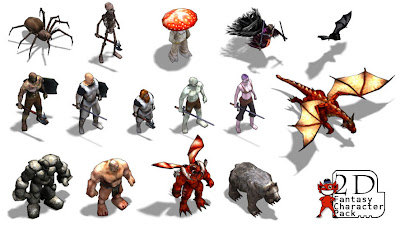
I'm also thinking about buying this Character Pack from the Torque Website, it's only 30 bucks which works out to 2 bucks per character so that's a pretty good deal.
-Ben
Balls of Fire!
Making the Game
I have a fairly good idea of where I want to go with this game and I hope I make it there!
If you are thinking about getting into game development and distributing your game on the Xbox Indie Channel, TorqueX is definitely the way to go. GarageGames has a list of games created with TorqueX here, List of TorqueX Games A few of those have been released to the Xbox Marketplace.
Most of those games seem pretty simple, but most of them were probably created by developers new to game development, which is what I think the indie games channel on the Xbox is all about.
I mentioned in my previous post about some code from John Kalanakis's website envygames.com. He has some code there with around ten or so sample games, each making use of a different feature of the TorqueX Engine, and with easily reuseable components.
Some of the components I'm using
AiPathFollowingComponent
AiPlayerChaseComponent
AiProximityAttackComponent
AnimatedCharacterComponent
FireProjectileComponent
WeaponComponent
Those do what you probably think they do and I was able to drop them into my game with no modifications in most cases. I don't even have the book from which those samples came from and I am still able to use them. To use components all you do is add them to your characters or game objects in the builder and then set the options. The AiPlayerChase has a target,speed, and chase or avoid option. It's that simple lol. And so much fun. I'm already spending lots of time playing my simple game and it's not really a game yet.
Here is the meat of AiPlayerChase to demonstrate how simple things can be.
private void _UpdateChase(float elapsed)
{
// determine angle to point our ship to the player
float angle = T2DVectorUtil.AngleFromTarget(_sceneObject.Position,
_TargetObject.Position);
PlayMyAnimation(angle);
// set the ship on its way towards the player
_sceneObject.Physics.Velocity =
T2DVectorUtil.VelocityFromTarget(_sceneObject.Position,
_TargetObject.Position, _speed);
return;
}
sceneObject is the AI and TargetObject is whatever you would like the AI to chase. This component is attached to every Wizard in the first video above, the Large Warrior is using AiPathFollowing which is pretty simple as well.
There is a learning curve to the TorqueBuilder and it will definitely help to have some background knowledge of C#, but you don't need much knowledge to start making games. I tend to learn the most when I don't know how to do something, if that makes any sense lol.
I'm also thinking about buying this Character Pack from the Torque Website, it's only 30 bucks which works out to 2 bucks per character so that's a pretty good deal.
I think these guys will be fun to shoot at :)
-Ben
Thursday, February 4, 2010
Making Games is Fun
So I've been using Torque X for about a week. If you aren't familiar with the product I suggest you familiarize yourself with it immediately. It's a game engine that's fully integrated into XNA and features a drag and drop type game editor that is easily hooked into your C# code. I believe TorqueX is used in a lot of those "create a game in two days or die trying" competitions which can occasionally produce something worth playing but most of the time seem to produce games that look like they were created in two days. Having said that, here is a clip of what I have been working on this week.
At the moment I am still in the tutorial phase of my TorqueX education. In fact, what you see above is a mixing of numerous tutorials with slight modifications. Besides the tutorials included with the TorqueX download, I got some sample code from this website, Envy Games TorqueX. The code is from The Complete Guide to Torque X, a book written by John Kanalakis, who has also taken over development of the TorqueX engine and has written a roadmap of where he wants to take TorqueX. RoadMap.
I am probably going to purchase the book, but I am having fun looking at his tutorials and ripping out his components for use in my game.
Components are pieces of code that can be easily shared between different games. For instance, the clip above makes use of an AIChase component and an AnimatedCharacterComponent among others. I combined these into one and got my AI to chase my player and display different animations. It would probably be better for me to keep these two components separate and I will modify my code later to do this.
You probably noticed in the clip that the animations weren't quite correct. I'm basing which animation to display based on rotation and its a bit off so I would like to display this rotation variable on the screen at runtime. I am about to do some research about how to display things onto the screen in TorqueX. Maybe someone wrote a debugging component I can use, or perhaps I will create one?
Figuring out how to display text on the screen using pure XNA is pretty easy, there are a lot of tutorials around concerning XNA, but not so much for TorqueX. I am glad that better documentation is high on the engine's roadmap priorities. Displaying text is a pretty basic problem though so I am sure I will find something I can use.
-Ben
Don't mind the music, just what I was listening to at the time.
At the moment I am still in the tutorial phase of my TorqueX education. In fact, what you see above is a mixing of numerous tutorials with slight modifications. Besides the tutorials included with the TorqueX download, I got some sample code from this website, Envy Games TorqueX. The code is from The Complete Guide to Torque X, a book written by John Kanalakis, who has also taken over development of the TorqueX engine and has written a roadmap of where he wants to take TorqueX. RoadMap.
I am probably going to purchase the book, but I am having fun looking at his tutorials and ripping out his components for use in my game.
Components are pieces of code that can be easily shared between different games. For instance, the clip above makes use of an AIChase component and an AnimatedCharacterComponent among others. I combined these into one and got my AI to chase my player and display different animations. It would probably be better for me to keep these two components separate and I will modify my code later to do this.
You probably noticed in the clip that the animations weren't quite correct. I'm basing which animation to display based on rotation and its a bit off so I would like to display this rotation variable on the screen at runtime. I am about to do some research about how to display things onto the screen in TorqueX. Maybe someone wrote a debugging component I can use, or perhaps I will create one?
Figuring out how to display text on the screen using pure XNA is pretty easy, there are a lot of tutorials around concerning XNA, but not so much for TorqueX. I am glad that better documentation is high on the engine's roadmap priorities. Displaying text is a pretty basic problem though so I am sure I will find something I can use.
-Ben
Subscribe to:
Posts (Atom)