Here's the latest video of my work in progress. Dungeon Smashers,
I think the game is coming along nicely :) If you can't tell I'm basically cloning Smash TV. I plan to implement an upgrade system, whereby you use the gold you collect to purchase more health, faster guns, quicker shoes. Although I have been thinking that using the decapitated heads of the enemies for the upgrades might be a better way to go. I thought of this idea after a bugged out particle effect left a bunch of orc heads strewn across the room!
If you're a fan of Smash TV, who isnt? You know that my exploding goblins are similar to those enemies in Smash TV that walk around the edges of the screen and then explode! The goblins have a slightly modified version of the playerchase component which I have called the edgewalker component. An early version of this component had the goblins shooting off gobbo parts in a 360 degree arc, I did this to ensure enough gobbo parts flew across the screen before smashing into the walls.
This sometimes resulted in quite a few gobbo parts and sometimes very few. I loaded up Smash TV to better understand how the game's exploding enemies worked. I noticed that before the enemies exploded they turned to face the center of the arena, and then they exploded. Always shooting off five pieces of shrapnel. I copied this mechanic.
I'm also writing a tutorial series detailing the creation of Dungeon Smashers you can view the tutorials here,
https://sites.google.com/site/soyouwanttomakeanarenashooter/
I plan to release this game onto the Xbox Indie Channel, but that won't be for a year at least.
-Darth
Showing posts with label TorqueX. Show all posts
Showing posts with label TorqueX. Show all posts
Thursday, May 6, 2010


Saturday, April 3, 2010
Now with more loot!!
Just a quick update on my game's progress.
As you can see I've added some loot and powerups!! I know how much we all love the shinys! In the future I will implement a way to actually spend these coins.
I am still in the very early stages of my game, just creating the basic objects. I'm basing my game heavily on Smash T.V. I routinely load that game up and study its mechanics lol! Did you know that a lot of the enemies in that game head towards the center of the screen upon entering the game and then switch to a playerchase method? Well now you do. I assume the Smash devs did this to stop the enemies from walking through the edge walls to get to the player. This can occur frequently if the quickest vector from the enemy to the player goes through the screen edge. I'm working on a system to fix this problem but it's not shown in the video.
I've increased the size of my characters by a few pixels and I think it makes a big difference in the gameplay. I am very conscious of character size in relation to the game world and its effect on immersion. All sizes are still subject to change.
-Darth
As you can see I've added some loot and powerups!! I know how much we all love the shinys! In the future I will implement a way to actually spend these coins.
I am still in the very early stages of my game, just creating the basic objects. I'm basing my game heavily on Smash T.V. I routinely load that game up and study its mechanics lol! Did you know that a lot of the enemies in that game head towards the center of the screen upon entering the game and then switch to a playerchase method? Well now you do. I assume the Smash devs did this to stop the enemies from walking through the edge walls to get to the player. This can occur frequently if the quickest vector from the enemy to the player goes through the screen edge. I'm working on a system to fix this problem but it's not shown in the video.
I've increased the size of my characters by a few pixels and I think it makes a big difference in the gameplay. I am very conscious of character size in relation to the game world and its effect on immersion. All sizes are still subject to change.
-Darth
Saturday, February 27, 2010
Please sir, may I have a license?
Well I have been using the TorqueX engine for the past 30 days. Although for the past few days I was a bit busy and didn't have much time for game development. At the moment all you can do in my game is run around and shoot holes through some wizards. The wizards are from Microsoft's RPG Sample kit, but I created the implosion animation myself!! I'm very happy with how it looks and I plan to spend a lot of time working on death animations.
That's the draw of TorqueX, at least for me. I can spend as much time as I want creating my exquisite implosions and explosions and not have to worry about how to get them into the game, all most things require are a simple drag and drop.
In the video above I'm making use of a component from Henry Schillings' GameKit. There is a blank object just offscreen that I attached the Spawning component too and then I told the object to spawn some wizards. What Fun! I'm still going back and forth about what kind of game I'm going to make, a gauntlet clone perhaps? Or an RPG? Or something completely different? Most people will tell you to write out a design document before you start creating your game, and one day I will probably do so. But for now I like to think of the TorqueX Builder as my easily mutable design document.
And I'm barely scratching the surface of TorqueX, take a look at this lighting demo included with TorqueX
I am not really sure how to use this lighting stuff in my game but I definitely want to figure it out. It looks pretty neat. And from the limited code used to get the lighting to work I don't think it will be that complicated.
But alas, my trial for the TorqueX Builder has run out! So for the moment I must put development of my game on hiatus. I have read on the forums of a few people creating their game with TorqueX but doing it entirely in code without the use of the builder. This is certainly an option but that sort of defeats the purpose of the drag and drop builder. And I have been enjoying the builder immensely. I might have to make some important decisions soon!!
-Ben
Wednesday, February 10, 2010
The greatest games are the ones you make yourself
I am currently on day 13 of my 30 day free trial of the Torque X game engine from GarageGames. One reason for writing about my game development process is to hopefully exchange my words for an engine license code ;) Below is a short video showing where I'm at with my game.
I have a fairly good idea of where I want to go with this game and I hope I make it there!
If you are thinking about getting into game development and distributing your game on the Xbox Indie Channel, TorqueX is definitely the way to go. GarageGames has a list of games created with TorqueX here, List of TorqueX Games A few of those have been released to the Xbox Marketplace.
Most of those games seem pretty simple, but most of them were probably created by developers new to game development, which is what I think the indie games channel on the Xbox is all about.
I mentioned in my previous post about some code from John Kalanakis's website envygames.com. He has some code there with around ten or so sample games, each making use of a different feature of the TorqueX Engine, and with easily reuseable components.
Some of the components I'm using
AiPathFollowingComponent
AiPlayerChaseComponent
AiProximityAttackComponent
AnimatedCharacterComponent
FireProjectileComponent
WeaponComponent
Those do what you probably think they do and I was able to drop them into my game with no modifications in most cases. I don't even have the book from which those samples came from and I am still able to use them. To use components all you do is add them to your characters or game objects in the builder and then set the options. The AiPlayerChase has a target,speed, and chase or avoid option. It's that simple lol. And so much fun. I'm already spending lots of time playing my simple game and it's not really a game yet.
Here is the meat of AiPlayerChase to demonstrate how simple things can be.
private void _UpdateChase(float elapsed)
{
// determine angle to point our ship to the player
float angle = T2DVectorUtil.AngleFromTarget(_sceneObject.Position,
_TargetObject.Position);
PlayMyAnimation(angle);
// set the ship on its way towards the player
_sceneObject.Physics.Velocity =
T2DVectorUtil.VelocityFromTarget(_sceneObject.Position,
_TargetObject.Position, _speed);
return;
}
sceneObject is the AI and TargetObject is whatever you would like the AI to chase. This component is attached to every Wizard in the first video above, the Large Warrior is using AiPathFollowing which is pretty simple as well.
There is a learning curve to the TorqueBuilder and it will definitely help to have some background knowledge of C#, but you don't need much knowledge to start making games. I tend to learn the most when I don't know how to do something, if that makes any sense lol.
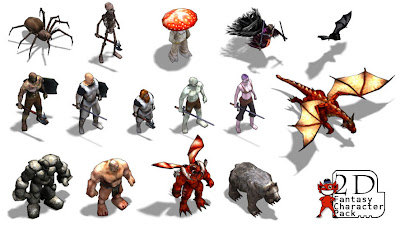
I'm also thinking about buying this Character Pack from the Torque Website, it's only 30 bucks which works out to 2 bucks per character so that's a pretty good deal.
-Ben
Balls of Fire!
Making the Game
I have a fairly good idea of where I want to go with this game and I hope I make it there!
If you are thinking about getting into game development and distributing your game on the Xbox Indie Channel, TorqueX is definitely the way to go. GarageGames has a list of games created with TorqueX here, List of TorqueX Games A few of those have been released to the Xbox Marketplace.
Most of those games seem pretty simple, but most of them were probably created by developers new to game development, which is what I think the indie games channel on the Xbox is all about.
I mentioned in my previous post about some code from John Kalanakis's website envygames.com. He has some code there with around ten or so sample games, each making use of a different feature of the TorqueX Engine, and with easily reuseable components.
Some of the components I'm using
AiPathFollowingComponent
AiPlayerChaseComponent
AiProximityAttackComponent
AnimatedCharacterComponent
FireProjectileComponent
WeaponComponent
Those do what you probably think they do and I was able to drop them into my game with no modifications in most cases. I don't even have the book from which those samples came from and I am still able to use them. To use components all you do is add them to your characters or game objects in the builder and then set the options. The AiPlayerChase has a target,speed, and chase or avoid option. It's that simple lol. And so much fun. I'm already spending lots of time playing my simple game and it's not really a game yet.
Here is the meat of AiPlayerChase to demonstrate how simple things can be.
private void _UpdateChase(float elapsed)
{
// determine angle to point our ship to the player
float angle = T2DVectorUtil.AngleFromTarget(_sceneObject.Position,
_TargetObject.Position);
PlayMyAnimation(angle);
// set the ship on its way towards the player
_sceneObject.Physics.Velocity =
T2DVectorUtil.VelocityFromTarget(_sceneObject.Position,
_TargetObject.Position, _speed);
return;
}
sceneObject is the AI and TargetObject is whatever you would like the AI to chase. This component is attached to every Wizard in the first video above, the Large Warrior is using AiPathFollowing which is pretty simple as well.
There is a learning curve to the TorqueBuilder and it will definitely help to have some background knowledge of C#, but you don't need much knowledge to start making games. I tend to learn the most when I don't know how to do something, if that makes any sense lol.
I'm also thinking about buying this Character Pack from the Torque Website, it's only 30 bucks which works out to 2 bucks per character so that's a pretty good deal.
I think these guys will be fun to shoot at :)
-Ben
Thursday, February 4, 2010
Making Games is Fun
So I've been using Torque X for about a week. If you aren't familiar with the product I suggest you familiarize yourself with it immediately. It's a game engine that's fully integrated into XNA and features a drag and drop type game editor that is easily hooked into your C# code. I believe TorqueX is used in a lot of those "create a game in two days or die trying" competitions which can occasionally produce something worth playing but most of the time seem to produce games that look like they were created in two days. Having said that, here is a clip of what I have been working on this week.
At the moment I am still in the tutorial phase of my TorqueX education. In fact, what you see above is a mixing of numerous tutorials with slight modifications. Besides the tutorials included with the TorqueX download, I got some sample code from this website, Envy Games TorqueX. The code is from The Complete Guide to Torque X, a book written by John Kanalakis, who has also taken over development of the TorqueX engine and has written a roadmap of where he wants to take TorqueX. RoadMap.
I am probably going to purchase the book, but I am having fun looking at his tutorials and ripping out his components for use in my game.
Components are pieces of code that can be easily shared between different games. For instance, the clip above makes use of an AIChase component and an AnimatedCharacterComponent among others. I combined these into one and got my AI to chase my player and display different animations. It would probably be better for me to keep these two components separate and I will modify my code later to do this.
You probably noticed in the clip that the animations weren't quite correct. I'm basing which animation to display based on rotation and its a bit off so I would like to display this rotation variable on the screen at runtime. I am about to do some research about how to display things onto the screen in TorqueX. Maybe someone wrote a debugging component I can use, or perhaps I will create one?
Figuring out how to display text on the screen using pure XNA is pretty easy, there are a lot of tutorials around concerning XNA, but not so much for TorqueX. I am glad that better documentation is high on the engine's roadmap priorities. Displaying text is a pretty basic problem though so I am sure I will find something I can use.
-Ben
Don't mind the music, just what I was listening to at the time.
At the moment I am still in the tutorial phase of my TorqueX education. In fact, what you see above is a mixing of numerous tutorials with slight modifications. Besides the tutorials included with the TorqueX download, I got some sample code from this website, Envy Games TorqueX. The code is from The Complete Guide to Torque X, a book written by John Kanalakis, who has also taken over development of the TorqueX engine and has written a roadmap of where he wants to take TorqueX. RoadMap.
I am probably going to purchase the book, but I am having fun looking at his tutorials and ripping out his components for use in my game.
Components are pieces of code that can be easily shared between different games. For instance, the clip above makes use of an AIChase component and an AnimatedCharacterComponent among others. I combined these into one and got my AI to chase my player and display different animations. It would probably be better for me to keep these two components separate and I will modify my code later to do this.
You probably noticed in the clip that the animations weren't quite correct. I'm basing which animation to display based on rotation and its a bit off so I would like to display this rotation variable on the screen at runtime. I am about to do some research about how to display things onto the screen in TorqueX. Maybe someone wrote a debugging component I can use, or perhaps I will create one?
Figuring out how to display text on the screen using pure XNA is pretty easy, there are a lot of tutorials around concerning XNA, but not so much for TorqueX. I am glad that better documentation is high on the engine's roadmap priorities. Displaying text is a pretty basic problem though so I am sure I will find something I can use.
-Ben
Subscribe to:
Posts (Atom)